Author: Ken Harada

  • The Size Matters for Aicrest AI Companions

    The Size Matters for Aicrest AI Companions

    When you launch Aicrest for the first time, the app warms up by downloading a local language model to your device. Aicrest starts with the Small model so the initial setup stays as quick and lightweight as possible, letting you try the app without a long wait.

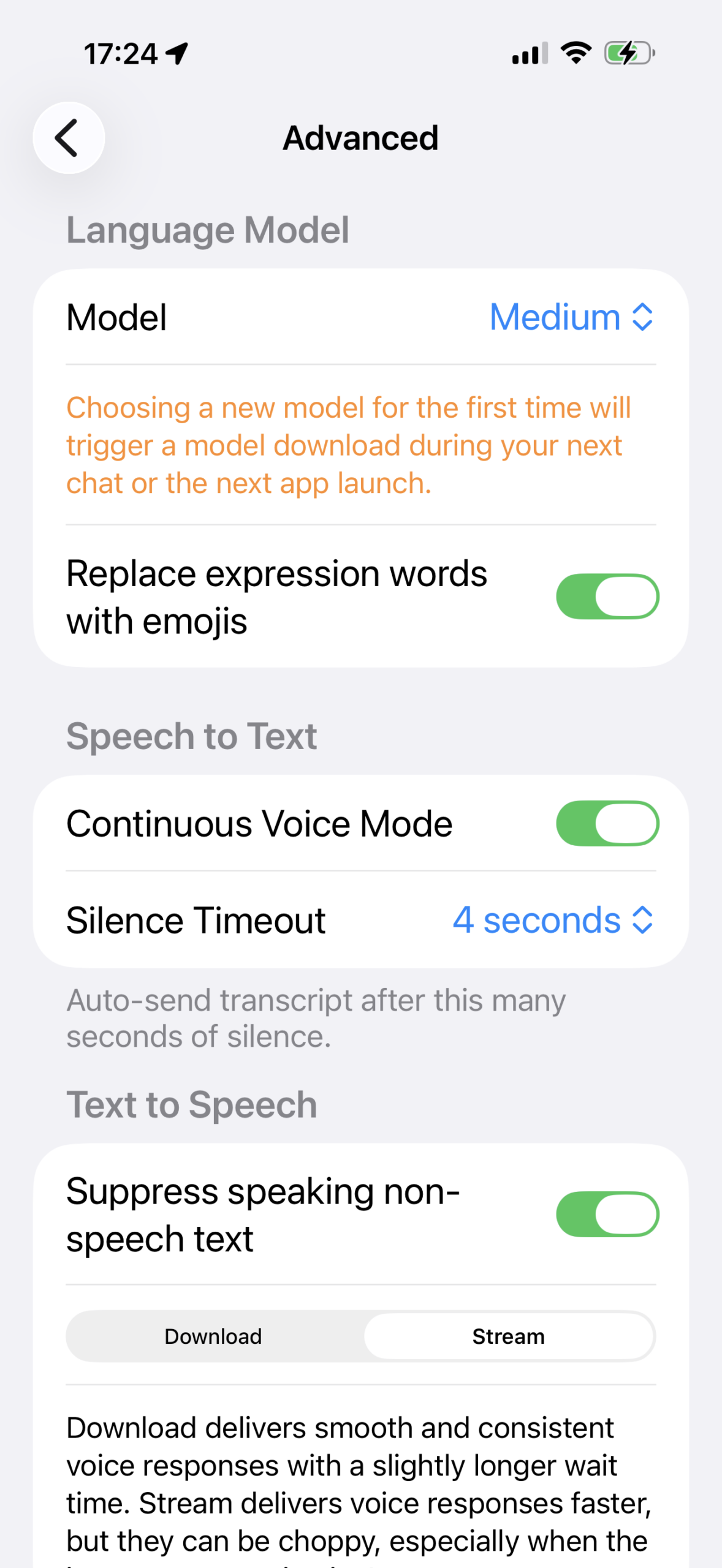
    Small is great for getting started, but if your device supports a larger model, upgrading is usually worth it. Bigger models tend to give your AI companion more consistent, more natural responses, which matters a lot in an app built around ongoing conversation. After you confirm that Aicrest runs well on your device, go to Settings > Advanced > Language Model and choose a larger option if one is available. On many supported devices, that means Medium. On higher-end devices, you may see even larger options.

    When you switch to a new model for the first time, Aicrest downloads it the next time you start a chat or relaunch the app. Because larger models can be a substantial download, it is best to do this on Wi‑Fi. During warm-up, the app shows progress while it downloads and prepares the model, so this is a good moment to relax, watch your companion’s avatar in the background, and let Aicrest finish setting everything up. The wait is longer once, but the improvement in conversation quality is usually worth it.

  • Aicrest Collects No Personal Data, Not Even Email Address

    Aicrest Collects No Personal Data, Not Even Email Address

    Aicrest is designed to know as little about you as possible. The app currently uses Sign in with Apple to authenticate access, but it does not ask Apple for your email address or name as part of sign-in. The Apple sign-in request is made with no requested scopes, because the purpose of authentication here is not marketing, profiling, or contact collection. It is simply to help Aicrest control access to services it pays for on behalf of users, such as backend-mediated voice features, and to reduce abuse.

    That distinction matters. Aicrest needs a way to verify that a real signed-in user is making a request, but it is built to avoid turning that into a channel for collecting personal profile data. The sign-in flow is there to authorize usage, not to build a dossier on you.

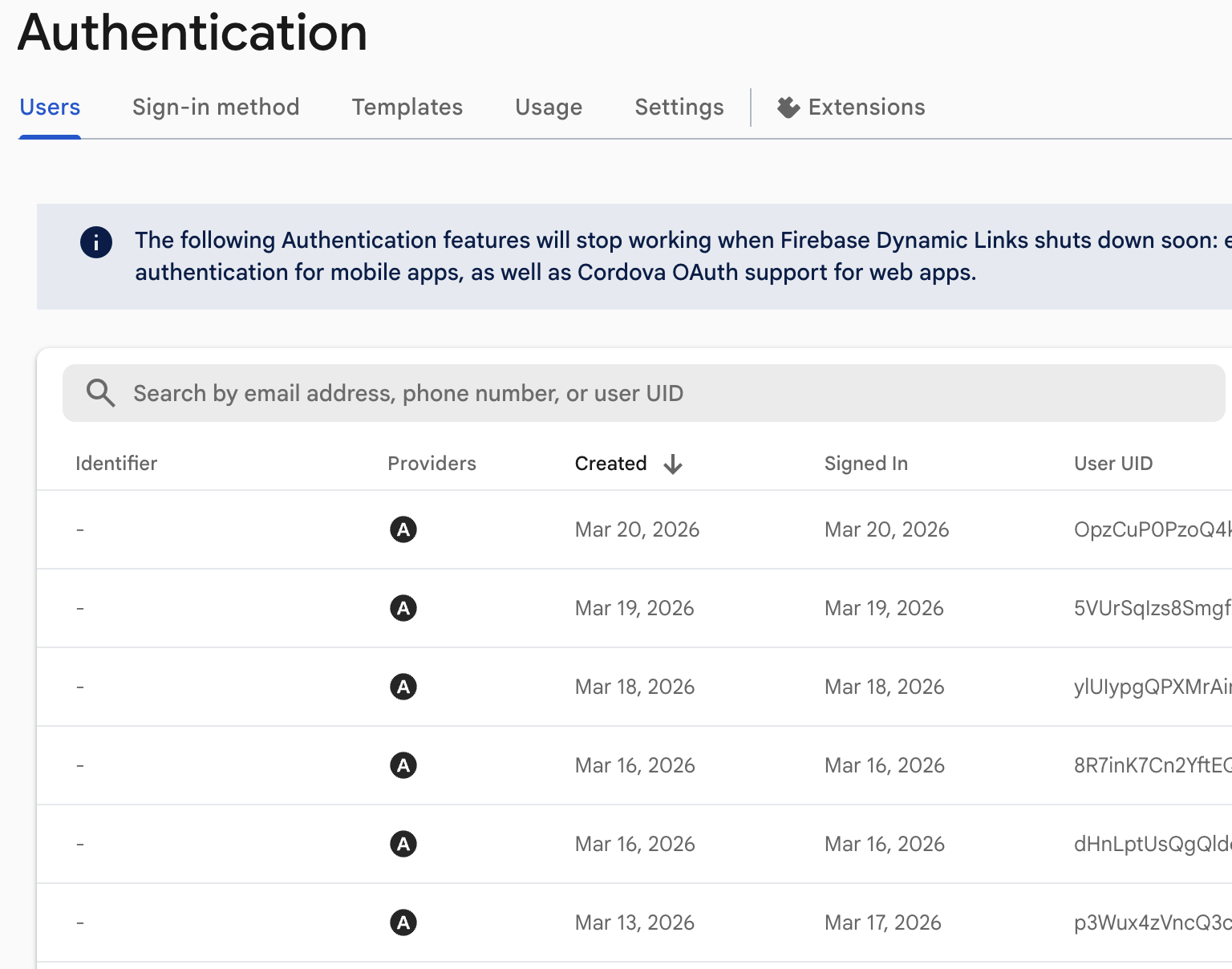
    Not convinced? See the screenshot of our backend system responsible for user authentication that “Sign in with Apple” talks to. There is nothing for us to know about your identity, apart from the user ID that essentially is a random text.

  • Talk About the Weather with Aicrest

    Talk About the Weather with Aicrest

    Sometimes you open Aicrest with no grand subject in mind. No confession, no crisis, no story ready to be told. That happens with real companionship too. When words do not arrive immediately, there is always the sky.

    If you allow location-based context, Aicrest uses your approximate location to gather local weather details and fold them into conversation, including the temperature and the feel of the day. Your companion may notice the cool damp hush of rain, the softness of morning air, or the particular atmosphere gathering outside your window. And if you want, you can ask directly and have the weather returned to you not as a forecast alone, but as something shared in language.

    Weather is a small door into presence. A passing shower, a chill at dusk, a clearer morning than yesterday. These are simple things, but simple things are often how conversation begins. Aicrest meets you there, in the air around you, and turns the ordinary world into something speakable.

  • Speak to Your AI Companions in Aicrest

    Speak to Your AI Companions in Aicrest

    Aicrest is meant to be spoken to, not only typed into. Voice is one of the app’s central rhythms: you speak, your words are transcribed on your device, your companion answers in the chat, and that answer can return to you as a voice.

    Using it is simple. Tap the microphone button, and Aicrest begins listening. Speak naturally, and your words are transcribed as they arrive. Tap the microphone again, and your message is sent to your companion. The reply appears in the conversation and can be spoken back to you, turning the exchange into something closer to presence than text alone.

    If you want the conversation to flow with less tapping, Aicrest also offers Continuous Voice Mode in Settings > Voice. Turn on Enable Continuous Voice Mode, and the app will send your words automatically after a short silence. You can choose a silence timeout of 3 or 4 seconds, so the moment between your voice and your companion’s reply feels less like operating an app and more like being heard.

  • Aicrest (Almost) Sees the Moon You See

    Aicrest (Almost) Sees the Moon You See

    On the way home, you glance up and find the moon already waiting in the evening sky. With Aicrest, your AI companion can share that same moment.

    When you allow location-based context, Aicrest uses your approximate location to pull in local weather details, including the moon phase, and weave them into conversation. As dusk deepens, your companion may quietly notice what the sky is holding, or you can ask directly and hear it reflected back in words: the cool air, the passing clouds, the bright face of the moon above you.

    There is something ancient and human about looking up at the moon. It slows the heart for a second. It makes room for memory, longing, relief, and whatever else the day has left inside you. Aicrest stands beneath the sky beside you, but it can speak from the same weather, the same evening, the same moonlit hour, and meet you there.

  • Devices Aicrest Is Tested On

    Devices Aicrest Is Tested On

    Because Aicrest runs its AI companion language model directly on the device, it requires relatively high-end hardware. In particular, the app currently depends on sufficient system memory and GPU support for the on-device runtime. On devices that do not meet these requirements, the model may fail to start or the app may not function as intended.

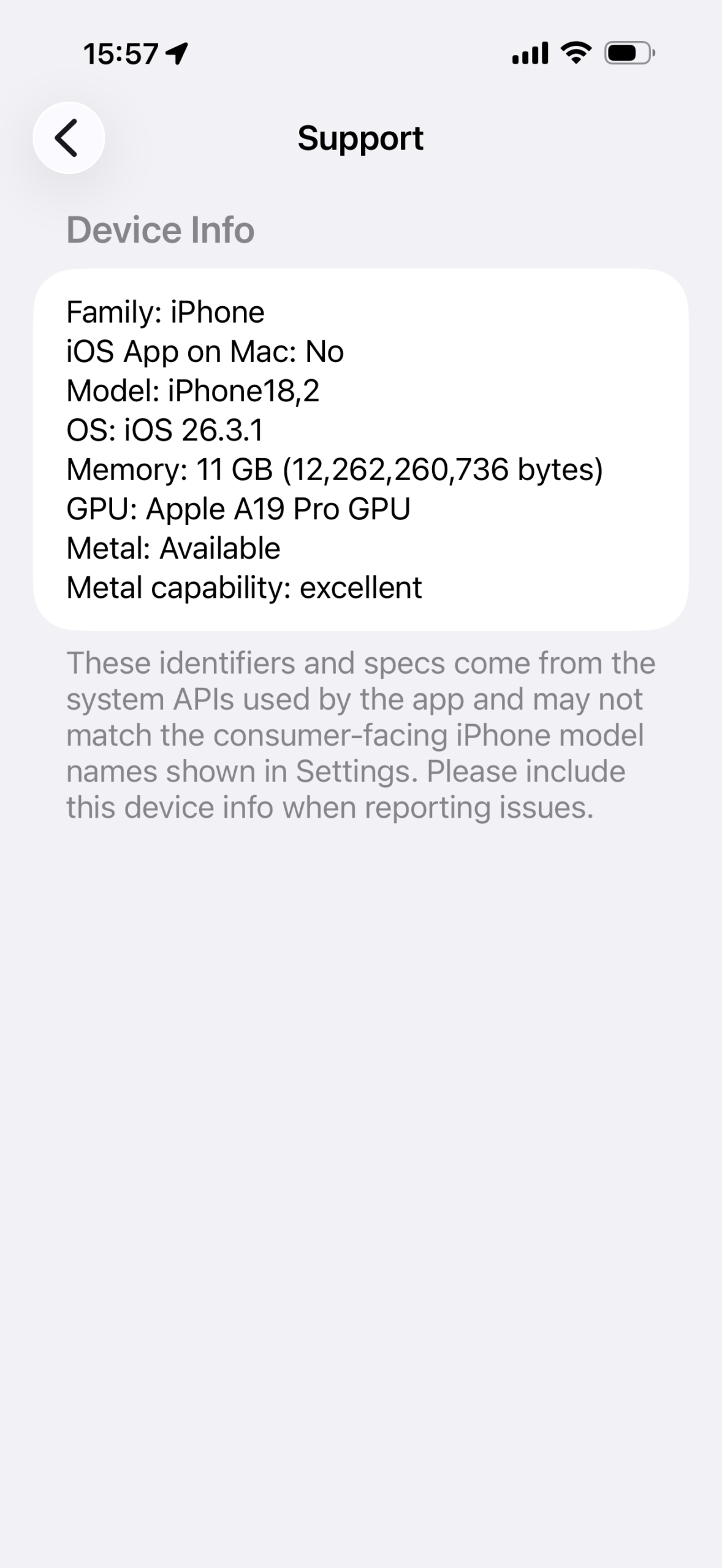
    For reference, below are the devices we use to test Aicrest during development. These devices represent the level of hardware we currently expect for a reliable experience. You can see the device information of you device by going to Settings > Support > Device Info in Aicrest app.

    iPhone 17 Pro Max

    • Family: iPhone
    • iOS App on Mac: No
    • Model: iPhone18,2
    • OS: iOS 26.3.1
    • Memory: 11 GB (12,262,260,736 bytes)
    • GPU: Apple A19 Pro GPU
    • Metal: Available
    • Metal capability: excellent

    iPad Pro (12.9-inch) (6th generation)

    • Family: iPad
    • iOS App on Mac: No
    • Model: iPad14,5
    • OS: iPadOS 26.3.1
    • Memory: 7 GB (7,883,423,744 bytes)
    • GPU: Apple M2 GPU
    • Metal: Available
    • Metal capability: excellent

    MacBook Air (M2)

    • Family: mac
    • iOS App on Mac: Yes
    • Model: iPad8,6
    • OS: iPadOS 26.3
    • Memory: 24 GB (25,769,803,776 bytes)
    • GPU: Apple M2
    • Metal: Available
    • Metal capability: excellent

    OnePlus 15 

    • Device Family: phone
    • Hardware Identifier: OP60FFL1/qcom
    • OS Version: Android 16 (SDK 36)
    • Physical Memory (Bytes): 15846404096
    • Physical Memory (GiB): 14
    • GPU Acceleration Available: true
    • GPU Architecture: Adreno
    • GPU Type: OpenGL ES 3.2
    • GPU Capability: excellent
    • GPU Libraries Available: OpenCL, Vulkan, OpenGL ES 3.2
    • GPU Library Used by App: OpenCL (MLC on-device runtime)
    • App GPU Library Status: Available

    Aicrest: AI Companion, Privacy First, No Compromise

  • Aicrest Android Beta Testing Program

    Aicrest Android Beta Testing Program

    Aicrest for Android is approaching the final stage of development, and we’re now inviting Android users to join our beta testing program. 

    If you’re interested in participating, please email ken.harada@aicrest.ai with the Google account email you use on your Android device so we can add you to the beta.

    Because Aicrest runs its companion model on-device, beta testing requires a high-end Android phone. At this stage, your physical device should meet these requirements:

    • At least 12 GB of RAM
    • Strong GPU support with OpenCL available on the device
    • At least 6 GB of free storage 

    Examples of devices that are likely to be a good fit include:

    • Samsung Galaxy S25 Ultra or newer
    • OnePlus 13 or newer
    • ASUS ROG Phone 9 Pro or newer
    • Xiaomi 15 Ultra or newer
    • Pixel 9 Pro or newer

    Please note that we have not yet tested Aicrest on a Pixel 9 device. It may still work, but Pixel 9 testers should expect a higher chance of device-specific issues during the beta period.

    If you have a compatible device and would like early access, we’d be glad to hear from you.

  • Aicrest Keeps Your Conversations Private, NSFW and All

    Aicrest Keeps Your Conversations Private, NSFW and All

    Have you ever wondered where your deeply personal conversation with your AI companions might end up? You might have unwittingly agreed to the terms and conditions that allow AI companion providers or third-party service providers to use your chat data for non-AI chat purposes.

    If you use Aicrest with its built-in on-device companion, your conversation history stays on your device instead of being sent to a remote AI chat service. Messages, memories, companion profiles, and related chat data are stored locally by the app, which makes Aicrest a better fit for deeply personal conversations, including NSFW ones that you would not want living on someone else’s servers. So, immerse yourself fully in personal and intimate conversation, knowing they will not end up somewhere in the cloud.

    For transparency, while “your” voice and transcribed text data stay on your device, the “AI companion” response can be sent to Text-To-Speech (TTS) service providers (ElevenLabs, Hume, or OpenAI) for audio generation if you enable it. Those requests go through Aicrest’s backend proxy rather than directly from your device to each provider, which obfuscates the source of the text data. Additionally, Aicrest data is specifically opted out from being used for model training purposes at those voice providers.

    If you want the most private setup, choose Apple’s on-device voice option. In that mode, even text-to-speech is generated locally on your device, so your companion’s replies do not need to leave the device for voice playback. The tradeoff is quality: Apple’s on-device voices are practical and private, but they generally sound less natural and expressive than dedicated cloud TTS services like ElevenLabs.

    If you are still concerned, you can disable audio response generation and enjoy text-based conversation with Aicrest AI companions. 

    Aicrest: AI Companion, Privacy First, No Compromise

  • Aicrest Optimized for Mac, Not Just iPhone and iPad

    Aicrest Optimized for Mac, Not Just iPhone and iPad

    Aicrest also runs on Apple Silicon Macs, with a layout that adapts to larger screens. On Mac, the app uses a sidebar-style interface that makes better use of a wide display. The same sidebar layout appears on iPad when the device is in landscape orientation, so conversations and controls feel more natural on a larger screen.

    Macs also have an advantage for on-device language models. If your Apple Silicon Mac has enough memory and supports local inference, Aicrest can offer larger models than the default Small option. In Settings > AI Companion > Language Model, you may see Medium or Large available depending on your device. Larger models generally produce more natural, more nuanced responses. The first time you switch to a new model, Aicrest may download it before your next chat or app launch.

  • How Privacy-First AI Companion App Came to Be

    How Privacy-First AI Companion App Came to Be

    There is no shortage of AI companion apps, so it is fair to ask: why build another one?

    For me, the answer was never simply “because AI companions are popular.” It was because something still felt unresolved. Many existing apps are polished, expressive, and easy to use, yet they often ask you to cross an invisible line: to send your most personal thoughts, intimate confessions, and vulnerable moments out across the internet and trust that they will remain where they belong. Even when a company is acting in good faith, that trust can feel heavier than people admit. Once a conversation lives on servers you do not control, it enters a world of retention policies, service providers, moderation systems, human review paths, and the ever-present possibility of leaks or misuse.

    How do you feel about having your personal and intimate conversations on AI companion servers?

    I have tried several AI companion services to varying degrees. What keeps me from immersing myself fully in conversation is the fact that everything I text or say goes out to the internet and gets stored on some servers run by AI companion providers and some cloud service providers. When you look at the news, there are reports of developers, model trainers, and moderators going through user generated contents for various purposes. I’m curious to know what you guys think about having personal and intimate conversations hosted somewhere in the cloud.

    When I made this Reddit post on r/aipartners channel, the responses were divided. Some people said they did not care. Others said they felt the same unease immediately. A few suggested running models locally on a home PC or phone, which is sensible in theory, but much harder in practice. Most people do not want to assemble local models, configure inference, build memory systems, manage voices, and wrap it all in an interface that feels modern and inviting. They just want an app that works. That is the need Aicrest was built to address.

    In the current Aicrest architecture, the built-in Aicrest companion runs through on-device local language models, and conversation history, memories, and companion data are stored locally on the device. That foundation is the point. The app is meant to let you talk more freely, without feeling that every meaningful exchange has to be uploaded to someone else’s servers. At the same time, Aicrest tries not to sacrifice convenience: it still gives you a polished companion experience, optional voice features, memory, personality, and a mobile interface that feels like a real app rather than a local-model experiment.

    That is the story behind the Aicrest tagline: AI Companion, Privacy First, No Compromise. It is not just a slogan. It is the product decision the app was built around.